# TERA24 Workshop
**Our tutorials**
Day 1: AthenaPK, 25/09, 14:40 CEST
Day 2: PLUTO and Idefix, 26/09, 13:00 CEST and 14:50 CEST
Day 3: AI for astrophysicists, 27/09, 09:00 CEST
## Pre-workshop tasks
Join slack channel TERA24: https://join.slack.com/t/tera24/shared_invite/zt-2qs37zlsn-TSFYRjTd3klNQ7ZcZRuWsQ
Please join our slack channel TERA24 (https://tera24.slack.com/) **before the workshop starts** on Wednesday, as we will use it to resolve any issue arising before and during the tutorials.
If you participate in one or more of the tutorials mentioned above, it is absolutely essential that you complete the following steps **before the workshop starts** on Wednesday, otherwise there may be processing delays and hence you will not be able to use the supercomputer.
**JuDoor portal**
If you do not have an account on JuDoor, please register. [Video instructions](https://drive.google.com/file/d/1-DfiNBP4Gta0av4lQmubkXIXzr2FW4a-/view).
* Click on “Register”
* Enter the email address you used to register for this event
* Click on “Send confirmation mail…”
* Open the confirmation email in your email program
* Click the confirmation link
Join the project **training2437** by following the link https://judoor.fz-juelich.de/projects/join/training2437.
If the link does not work, you can join the project by doing the following, [video instructions](https://drive.google.com/file/d/1XdQSdML_jqGqvr_2WXqzlE-G6hiuYE2_/view):
* Login to https://judoor.fz-juelich.de
* Scroll to section “Projects”
* Hit the link “Join a project”
* Enter the Project id: “training2437” for our tutorials
* Click on “Join project”
Please be patient, as the organizer needs to accept your join request.
Sign the usage agreement. [Video instructions](https://drive.google.com/file/d/1mEN1GmWyGFp75uMIi4d6Tpek2NC_X8eY/view).
* Login to https://judoor.fz-juelich.de
* Scroll to section “Systems”
* Click on “You need to sign the usage agreement to access this system”
* Sign the usage agreement
Please be patient, this may take up to 15 minutes!
**Jupyter-JSC**
Login to https://jupyter-jsc.fz-juelich.de. [Video instructions](https://drive.google.com/file/d/1S8_DaZRjBUOv7S3xT_KO8WFf44BqlR0O/view)
* Click on “Login”
* Login with your new JSC account
* If this is your first login:
** click on “Register”
** agree to the terms of service
** click the link in the confirmation mail
**CONGRATULATIONS - YOU ARE READY FOR OUR TUTORIALS**
## Jupyter-JSC configuration
* Click on "NEW JUPYTERLAB"
* Choose the following settings:
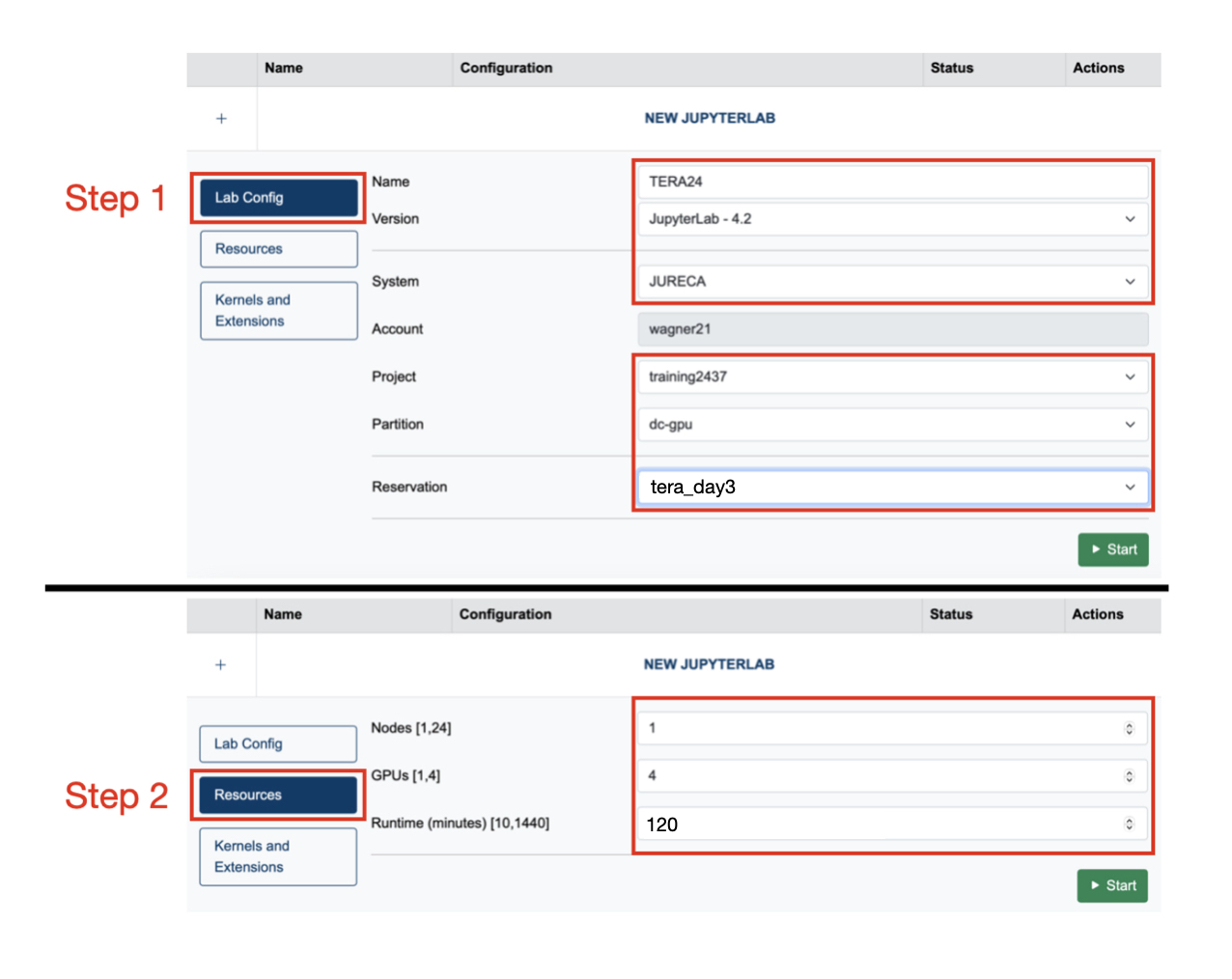
* Note: At reservation, select the right tutorial day
* Click on "Start"
Please be patient until JupyterLab starts.